
IPTV works by delivering television through an Internet Protocol network. The provider prepares the video, sends it as digital data, and your device turns that data into pictures and sound. You can start watching while the stream continues arriving, without downloading an entire programme first.
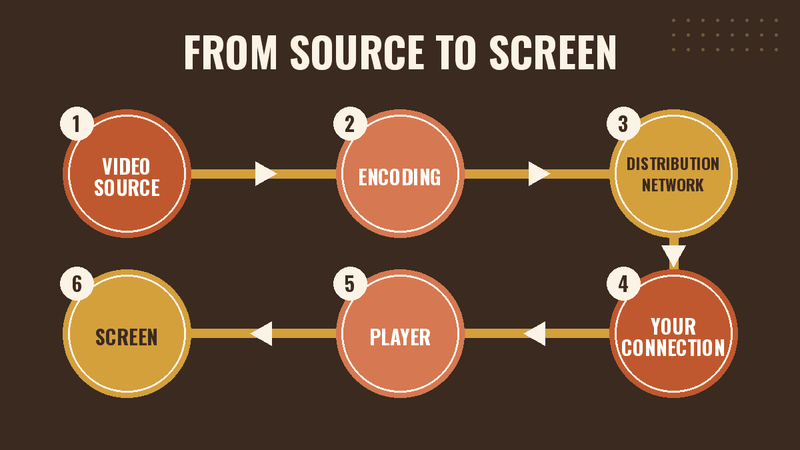
The basic path is:
Video source → encoding → distribution network → your connection → player → screen
The details depend on whether the service uses a managed network or streams over the public internet.
What does IPTV mean?
IPTV stands for Internet Protocol Television. Internet Protocol is the system networks use to address and route data between devices. With IPTV, television travels through that network as data packets.
In its formal technical meaning, IPTV includes a managed network designed to support requirements for picture quality, reliability, security, and interactivity.
Does IPTV always use the public internet?
No. An operator can deliver IPTV through a managed network, with control over how television traffic reaches subscribers. Your television service can therefore use IP technology without travelling over the same public internet paths as ordinary websites.
In everyday usage, “IPTV” also describes services that deliver channels through your regular internet connection. These commonly use over-the-top, or OTT, delivery. Understanding that distinction helps explain why two services labelled IPTV can have different equipment requirements and playback behaviour.
How does IPTV get a channel onto your screen?
An IPTV system receives a video source, prepares it for network delivery, distributes it, and plays it on a compatible device. Public-internet streaming commonly adds a packaging stage that divides video into small media segments.
1. Where does the video come from?
The provider receives a live feed or accesses a stored video file. A live source might come from a broadcaster or an event production system. An on-demand source is a prerecorded programme.
The incoming content can include video, audio, and captions, which the system processes for delivery.
2. How is the video prepared?
An encoder compresses the video using a codec, such as H.264 or HEVC. Compression reduces the amount of data needed to represent the picture.
For adaptive streaming, the system can prepare several versions at different bitrates and resolutions. A packager then organises the compressed content into a streaming format, such as HLS or MPEG-DASH.
Encoding and packaging perform different jobs: encoding compresses the media, while packaging prepares it for delivery.
3. How does the stream reach viewers?
For public-internet delivery, a content delivery network, or CDN, can distribute the stream through servers closer to viewers. This reduces pressure on the original video server and can improve delivery performance.
A CDN helps distribute both live and on-demand content. It does not eliminate problems elsewhere, such as an unstable home connection.
4. What happens when you press play?
Your app or set-top box identifies the selected content and requests access. The service checks whether your account is entitled to receive it. Protected content may also require a valid playback licence before the device can decrypt and display it.
With HLS, the player reads a playlist describing available media segments, then requests those segments as playback progresses. A media segment contains part of the programme and travels across the network in many smaller data packets.
5. How does your device produce the picture?
The player keeps some incoming media in a temporary buffer. The device then decodes the compressed video and audio and presents them together.
Compatibility matters at several levels, including the streaming protocol, media container, codec, and content-protection system. A device that supports one stream may not support another.
How do multicast and unicast delivery differ?
Multicast distributes a stream to a group of receivers. Unicast delivers data to an individual receiver. These approaches let providers serve different viewing patterns efficiently.
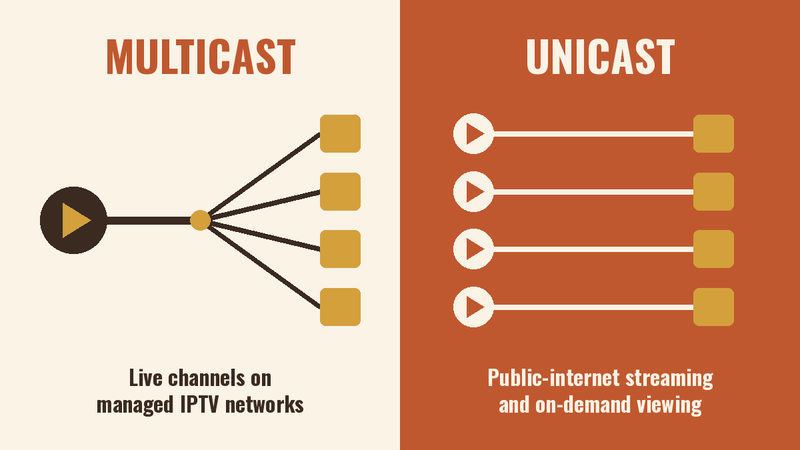
| Delivery method | How it works | Typical application |
| Multicast | Network equipment copies a shared stream where paths branch toward viewers | Live channels on managed IPTV networks |
| Unicast | Each viewer receives an individual delivery session | Public-internet streaming and on-demand viewing |
Multicast suits viewers watching the same channel at the same time. Compatible network equipment forwards the stream toward receivers that have joined its group.
Unicast suits individual playback requests. Different viewers can watch different programmes or start the same programme at different points. A service may combine both methods.
Why does IPTV picture quality sometimes change?
With adaptive bitrate streaming, the player chooses between prepared versions of the video as network conditions change. It can reduce quality when less bandwidth is available and increase quality when conditions improve.
This helps keep playback running during changes in connection speed. A softer picture may indicate that the player has selected a lower-quality version to avoid an interruption. This feature depends on how the service and player are configured.
What connection speed does IPTV need?
There is no single speed requirement for every IPTV stream. The required bandwidth depends on the stream’s bitrate, which is affected by compression, resolution, frame rate, and picture complexity.
For public-internet streaming, the connection must deliver data fast enough to keep ahead of playback. Allow room for changing conditions and other household activity, rather than matching the stream’s bitrate exactly.
For example, a hypothetical stream averaging 8 Mbps transfers approximately 3.6 GB per hour, before network overhead. Two such streams average about 16 Mbps of media traffic.
These are calculations for that example, not universal IPTV requirements. Two streams labelled 1080p can use different amounts of data.
Why does IPTV buffer or fall behind live television?
Playback pauses when the player runs out of usable buffered media. Possible causes include weak Wi-Fi, insufficient available bandwidth, congestion, provider delivery problems, or limitations on the viewing device.
A larger buffer can absorb brief delivery interruptions. It cannot sustain playback indefinitely when incoming data consistently arrives too slowly.
Useful first checks include trying Ethernet, reducing competing network activity, and checking whether the problem affects one channel or the whole service. These checks help identify where the problem may originate.
Live streaming also involves processing and playback delay. Low-latency streaming methods can reduce that delay, but a “live” stream still passes through a delivery system before appearing on your screen.
What do you need to watch IPTV?
You need access to the service, a compatible viewing device, its supported player or app, and a suitable network connection. Depending on the service, you might watch through a smart TV, streaming device, phone, computer, or supplied set-top box.
A dedicated IPTV box is necessary only when the service requires it. Compatibility involves more than installing an app, particularly when the stream uses specific codecs or content protection.
Does an IPTV player include channels?
An IPTV player handles playback and navigation. The service supplies access to content. Installing a player alone does not establish which channels or programmes you can receive.
What does the electronic program guide do?
An electronic program guide, or EPG, provides schedule information, such as programme titles and broadcast times. That information is separate from the video itself, so missing guide entries do not necessarily mean the channel stream is unavailable.
To understand a particular IPTV setup, first identify its delivery model, supported devices, and connection requirements. Those details determine how the stream reaches your screen and where playback problems are most likely to arise.