You can get local channels without cable by connecting a TV antenna or subscribing to a streaming service that carries your local stations. An antenna provides available over-the-air broadcasts without a monthly TV subscription. Streaming works over the internet, and its local lineup depends on your location and plan.
This guide covers U.S. local television, including ABC, CBS, FOX, NBC, PBS, and other stations where available. Start with the exact stations and programs you want. A free local news stream, an on-demand episode, and a full live broadcast channel provide different kinds of access.
Which route should you choose for local channels?
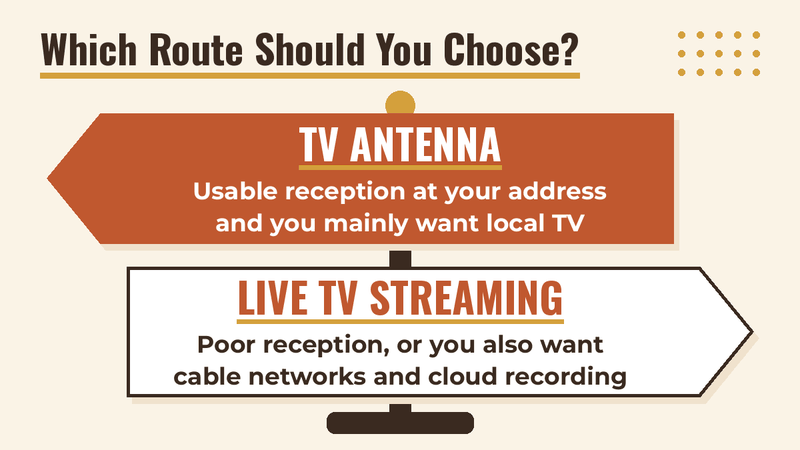
Choose an antenna when your address has usable broadcast reception and you mainly want local television. Choose a live TV streaming package when reception is poor or you also want cable networks and cloud recording. A combination can fill gaps, but each added subscription increases your recurring cost.
| Route | What it provides | Main limitation |
|---|---|---|
| TV antenna | Receivable local broadcast stations and their available subchannels | Reception depends on your address, antenna, and placement |
| Live TV streaming package | The local stations included in your market and selected plan, alongside other channels | A recurring subscription, internet access, and location rules |
| Individual network subscription | A particular network’s local feed when the eligible plan includes it | Does not replace a complete lineup of local stations |
| Free station and news apps | Participating local newscasts, clips, and sometimes other station programming | Usually do not reproduce the full broadcast schedule |
| Antenna plus selected apps | Broadcast channels with targeted streaming additions | May require switching between the TV tuner and apps |
For Example, an antenna that receives your ABC, CBS, FOX, NBC, and PBS stations may cover your everyday viewing. A household that also needs cable sports channels must check those separately. Receiving local stations does not supply every sports channel or streaming-exclusive event.
How can you check which stations an antenna might receive?
Use an address-based TV reception map before choosing an antenna. Check the stations you need, their transmitter directions, predicted signal strength, and actual broadcast frequencies. A ZIP code offers a starting point, but your building and exact location can make reception differ from nearby homes.
Treat reception predictions as estimates. Some maps assume an elevated outdoor antenna, so their results may overstate what an indoor antenna can receive. Hills, surrounding buildings, construction materials, and antenna height can affect the signal reaching your television.
Why do VHF and UHF support matter?
Local stations transmit on VHF or UHF frequencies. Your antenna needs to support the bands used by the stations you want. A station’s familiar channel number on the TV can differ from its actual radio-frequency channel, so do not choose an antenna based only on the displayed number.
Check the antenna’s specifications against the reception report, including low-VHF support when a required station uses that band. A large advertised mileage range is not a guarantee of reception at your address.
Should you use an indoor, attic, or outdoor antenna?
An indoor antenna is a practical starting point where signals are strong and placement is flexible. An attic or outdoor installation may help where walls, terrain, or distance make indoor reception unreliable. Attic materials can still weaken signals, and an outdoor installation involves mounting, weather protection, and appropriate grounding.
Start with a returnable antenna suitable for your local frequencies rather than buying the largest model immediately. For rooftop or other elevated installation, use a qualified installer when needed and keep the antenna and its mounting equipment away from power lines.
How do you connect an antenna and scan for channels?
Connect the antenna to your television’s antenna input, select the broadcast TV source, and run an antenna channel scan. The TV needs a compatible broadcast tuner. A streaming stick receives internet content and does not, by itself, turn an antenna signal into television channels.
- Check the TV’s manual for a U.S. digital broadcast tuner and an input labeled ANT IN, RF IN, or a similar name. A display without a suitable tuner needs an external tuner with a compatible TV connection.
- Connect the antenna’s coaxial cable to the tuner’s antenna input. Follow the antenna instructions for any required power connection.
- Place an indoor antenna high enough to test useful positions and, where practical, toward the transmitters. Try a window or another less obstructed location.
- Open the TV’s channel or broadcasting settings. Choose Air, Antenna, or Over-the-Air rather than Cable, then run Auto Scan or Auto Program.
- Open each must-have station and watch long enough to check for picture breakup, missing audio, or signal loss. A channel appearing in the scan does not prove stable reception.
- Adjust placement or direction when needed, then rescan. Keep the position that provides the most reliable reception of your priority stations.
Menu names vary by television. Your TV’s built-in internet channel guide may be separate from its antenna channel list. Select the broadcast tuner when you want to check the antenna results.
What should you try if channels are missing or breaking up?
First confirm the antenna connection and scan mode. Next, compare the missing station’s frequency and direction with your antenna’s capabilities and position. Test one television with a short, direct cable connection before adding splitters or recording equipment.
- Reposition the antenna and test another height or direction. A small move can change reception.
- Check for loose connectors, damaged coaxial cable, and unnecessary splitters.
- Use a signal-quality display if your tuner provides one. Reliable decoding matters more than the highest signal-strength reading.
- Follow the manufacturer’s instructions when testing an amplifier. Amplification can help compensate for some cable or distribution losses, but it can also overload a strong signal.
- Rescan after a station announces a broadcast-frequency change, or when your saved channel list no longer matches available broadcasts.
An amplifier cannot make an unsuitable antenna receive every missing station. When placement changes do not help, reassess the antenna’s frequency coverage and installation location before adding more accessories.
How do you get local channels through live TV streaming?
Enter your home ZIP code in a service’s channel lookup and compare the exact local stations in the plan you intend to buy. Services such as YouTube TV and Hulu + Live TV offer local-channel access, but availability follows market coverage and carriage agreements. A national network logo alone is not enough.
Check the affiliate’s name or call sign where available, especially near a market boundary. Your streaming lineup may differ from what an antenna receives or what your former cable provider carried. Local-channel availability can also change during carriage disputes.
Sling carries some ABC, FOX, and NBC stations in selected markets and eligible plans. Do not assume that a lower-priced package includes every major local network. Use the service’s current lineup checker to establish what you would actually receive.
- Confirm the required local affiliates and any cable networks in the exact package.
- Check whether your TV or streaming device supports the service’s app.
- Review simultaneous-stream limits, recording features, home-location requirements, and travel restrictions.
- Compare the regular recurring price, required extras, and applicable charges after any introductory offer.
- Test the live channels on your actual viewing devices before ending your existing TV service, using a trial only when one is available and you qualify.
Streaming requires a working internet connection. Compare the service’s connection recommendations with your household’s simultaneous viewing and other internet use. A strong broadband plan does not eliminate weak Wi-Fi near the TV. Ethernet can help when your device supports it.
Can you keep watching your home stations while traveling?
Travel access depends on the service and device. A provider may show local channels for your current location, restrict living-room devices to a home network, or limit recording outside your home market. Check the current travel rules rather than assuming your home lineup follows you everywhere.
If the app assigns the wrong local area, review its home and playback-location settings and contact support. An internet provider’s location information can sometimes differ from your physical location.
Can individual network subscriptions replace a live TV bundle?
Individual subscriptions can work when you need one particular local network. They are less suitable when you need a complete set of affiliates. Check the plan’s live local-channel entitlement carefully, since access to on-demand shows or selected live events does not necessarily include the full local station.
| Option | Local-channel access to check | Important distinction |
|---|---|---|
| Paramount+ Premium | The live local CBS station available for your location | The Essential plan does not include the full live local CBS station |
| Peacock Premium Plus | The live local NBC station assigned to your location | The local feed includes ads, and some programming can be restricted |
| PBS app | Your participating local PBS station’s livestream in its eligible area | The livestream does not require a paid PBS Passport benefit |
These options cover different networks. Combining CBS and NBC subscriptions does not automatically add ABC, FOX, or independent stations. Compare the total subscription cost with the coverage you need before treating separate apps as a bundle replacement.
Can you watch local channels for free without an antenna?
You can often stream local news free through a station’s app or participating news services. Full local broadcast channels are more limited. PBS offers eligible local station livestreams without a fee, while many commercial-station apps focus on newscasts and clips rather than the entire daily schedule.
NewsON is one example of a service offering participating stations’ live and previous newscasts. Your station may also have its own free app. Check station coverage and whether the feed is live, a replay, or a continuous news stream.
Free streaming platforms can contain many channels without carrying your local ABC, CBS, FOX, or NBC affiliate. A channel with a familiar network brand may be a national news feed or a themed streaming channel. Open the guide and inspect the programming rather than relying on the name.
An app that asks you to sign in with a TV provider may require an eligible paid subscription. Downloading the app does not establish free access to every program.
How can you record local channels or watch on several TVs?
For antenna television, use a compatible over-the-air DVR to record broadcasts, or a network-connected tuner or DVR to distribute them to supported devices. For streaming television, check the package’s cloud DVR and simultaneous-stream rules. Neither approach creates access to a station missing from your reception or subscription.
An antenna connected directly to one TV supplies that TV’s tuner. To serve several televisions, you can distribute the signal through appropriate coaxial wiring and splitters, or use a supported home-network device. Splitting a weak signal can reduce reliability, so establish stable reception first.
Network-connected antenna devices may require internet access for setup, guide information, or other functions. Products such as Tablo use an antenna to receive local broadcasts and supported apps to watch them around the home. Verify the exact model’s device support, tuner count, storage, fees, and internet requirements.
Direct antenna viewing through a powered TV and tuner does not require broadband. That can provide another way to watch local television during an internet outage, although it still depends on the broadcast signal and power for the equipment.
What costs should you compare before choosing a setup?
Separate one-time equipment costs from recurring expenses. An antenna route can avoid a monthly broadcast-TV subscription, but the antenna, installation, cabling, tuner, or optional DVR may cost money. Streaming adds subscription costs and requires internet access, with possible equipment, add-on, or data charges.
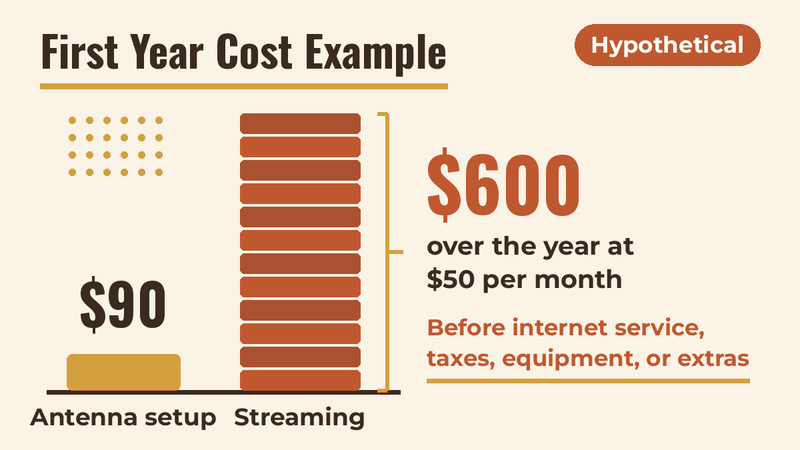
For Example, a $90 antenna setup costs $90 in the first year if it has no installation or recurring fees. A hypothetical $50-per-month streaming subscription costs $600 over the same year before the cost of internet service, taxes, equipment, or extras. These illustrative figures compare cost structure and are not current product quotes.
Pay for the channels and features you actually need. A large package may be worthwhile for cable sports or recording convenience, but its channel count does not prove that your preferred local affiliate is included.
Frequently asked questions
Do I need a smart TV to watch antenna channels?
No. You need a television with a compatible broadcast tuner, or an external tuner that connects to your display. Smart TV apps are separate from antenna reception.
Can I get every local channel with one antenna?
Not necessarily. Your location, terrain, antenna support, transmitter directions, and installation affect reception. Check your required stations individually and test them before relying on the setup.
Can I watch local channels on Roku or Fire TV without cable?
Yes, through supported streaming apps or a compatible network-connected antenna tuner or DVR. A streaming player alone does not receive over-the-air broadcasts. A television with a built-in tuner can also receive an antenna directly through its antenna input.
Does an antenna provide ESPN or every game involving my local team?
No. An antenna receives available broadcast stations, not cable-only networks such as ESPN. It can show games aired by those stations, but other games may require a separate channel or streaming subscription.
Do free local news apps include live network entertainment?
Usually not. Many free news apps provide newscasts, clips, or dedicated news streams. Check whether the app actually carries the station’s full live schedule before expecting network shows or sports.
What should you do first?
Write down your must-have local stations, then check antenna reception at your address. Test an antenna when the predictions are promising. When reception cannot cover your needs, compare the exact local lineup of streaming plans and choose the smallest combination that provides your required programs and features.