You can usually cancel cable TV and keep internet service with the same provider. Request a TV-only cancellation, confirm the new internet plan and price, and keep the equipment that powers your connection. Removing TV can change bundle discounts, so your savings may be smaller than the cable charge on your current bill.
The safest approach is to settle the account changes before disconnecting any devices. Your service agreement, provider, and location determine the cancellation date, return requirements, and billing adjustments.
Can you cancel cable without losing internet?
In many residential bundles, TV and internet are separate subscriptions even when they share a bill or a coaxial cable. Canceling the TV subscription does not require canceling broadband. The provider must process the order correctly, however, and your existing bundle may need to become an internet-only plan.
Ask for a change to the services on your account rather than closure of the entire account. Identify anything else you want to keep, such as home phone service, and confirm whether its price or eligibility will change.
Unplugging a TV box or returning it does not, by itself, establish that your TV subscription has been canceled. Obtain a cancellation confirmation with an effective date.
What bundle changes should you check before canceling?
Get an itemized quote for your remaining services. The internet charge shown inside a discounted bundle is not necessarily the price you will pay after TV is removed. Check both the immediate monthly total and the price after any new promotion expires.
| Check | What to confirm |
|---|---|
| Internet price | The recurring price after removing TV, including required fees and equipment charges |
| Discounts | Which bundle, autopay, paperless billing, loyalty, or other credits continue |
| Promotion | Its end date, the later price, and whether existing-customer eligibility applies |
| Internet plan | Download and upload speeds, data allowance, and any overage or unlimited-data charge |
| Commitment | Whether the change triggers a fee or starts a new minimum term |
| Other services | Any price changes to phone, mobile, security, or included streaming subscriptions |
| One-time costs | Any activation, equipment exchange, shipping, or service-change charge |
A public offer can help you compare options, but it is not proof that your current account qualifies. Ask for an order summary showing the plan you will actually receive. Where available, review the plan’s broadband label alongside the account-specific quote.
How can you calculate the actual savings?
Compare your current full monthly bill with the new full monthly cost. Add replacement TV subscriptions only if you plan to buy them. Keep one-time cancellation and setup costs separate from recurring costs.
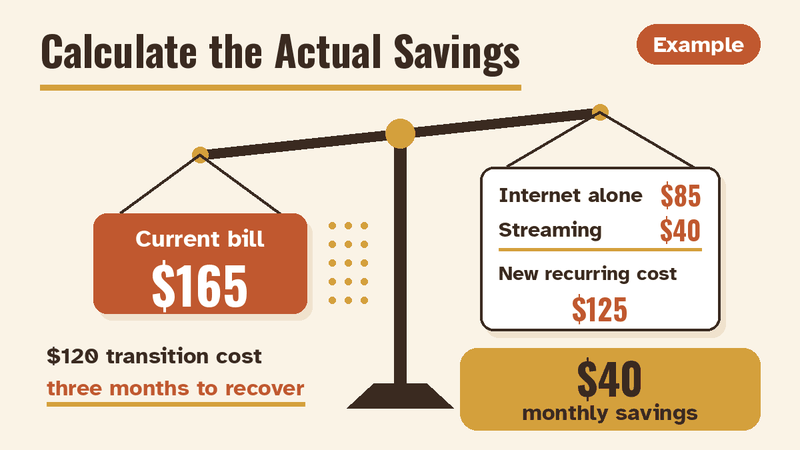
For Example, suppose your current TV-and-internet bill is $165 per month. Internet alone would cost $85, and your chosen streaming subscriptions would total $40. Your new recurring cost would be $125, giving you $40 in monthly savings. These are illustrative figures, not a provider quote.
A $120 one-time transition cost would take three months to recover at that savings rate. Recalculate if promotional prices expire during that period.
When should you cancel to avoid an extra TV charge?
Choose the effective cancellation date using your service period and the provider’s billing rules. Your payment due date may differ from the date your next service period begins. Some plans allow prorated adjustments, while others charge for a full monthly period, subject to applicable rules and exceptions.
Ask whether TV stops immediately, on a requested date, or at the end of the paid period. Also ask whether advance notice is required and whether the provider accepts future-dated cancellation requests. Do not wait until the last day without confirming how the order must be submitted.
Check any remaining commitment before approving the change. A contract-free plan and a promotional bundle with a minimum term can have different consequences. Ask for the exact cancellation or downgrade charge, if any, rather than assuming every service change is free.
Test your replacement viewing setup before the TV cutoff if uninterrupted viewing matters. Keep any overlap deliberate and include it in your transition costs.
What should you say when requesting a TV-only cancellation?
State the services you want removed and retained in the same request. Before accepting an offer, confirm that the order preserves internet service and does not add unwanted TV, paid extras, or a new commitment.
Use this wording as a starting point:
I want to cancel my cable TV subscription and keep my internet service active. Please confirm the internet plan, total monthly price, discount expiration date, and any service-change fees before processing the order. I also need the TV cancellation date, the exact equipment to return, and written confirmation of the change.
Have the account details and any required identity verification ready. Some providers require the account owner to make the request. Use the cancellation channel listed in your account or current provider instructions.
Save the order number, confirmation email or chat transcript, and the date of the conversation. Review the confirmation for the retained internet plan and services, not just the TV cancellation.
Which equipment should you return, and what should you keep?
Return only the provider-owned devices identified for the canceled TV service or a required equipment exchange. Keep the modem, router, or combined gateway needed for active internet service unless the provider specifically arranges a replacement. Match each device to the account’s equipment list before packing it.
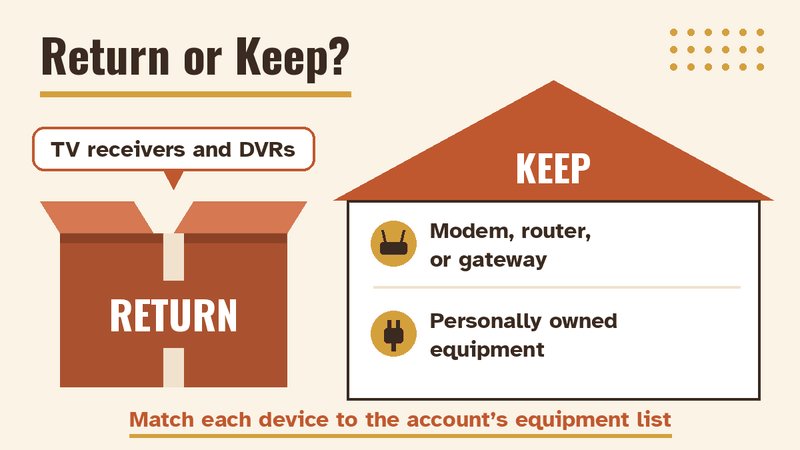
- TV receivers and DVRs: Confirm which rented boxes must go back and which accessories are required.
- Modem or internet gateway: Keep the device supporting your remaining internet plan unless an exchange is required.
- Router, mesh units, and Wi-Fi extenders: Confirm whether they remain included or become separately billable.
- Provider-supplied streaming devices: Check whether each device is rented, purchased, or financed. Its appearance does not establish ownership.
- Personally owned equipment: Do not include your own router, modem, streaming player, or cables unless there is a specific reason.
A combined gateway can support internet and home phone service as well as TV-related functions. Do not return it just because the TV service uses it. For fiber service, ask before touching an installed fiber terminal or its power supply.
Should you disconnect the coaxial cable or remove a splitter?
Leave the working internet connection in place. Cable broadband can use the same wall outlet and splitter as a TV box. Disconnect only the identified TV device. Ask the provider whether any unused connection needs attention before changing splitters, amplifiers, or other shared wiring.
How can you prove that equipment was returned?
Get the return method and deadline for your specific order in writing. Confirm whether the deadline refers to shipment or receipt, which locations accept the devices, and whether you need a prepaid label. Use the provider’s approved process rather than sending equipment to an address you find elsewhere.
Photograph the device labels and keep a record of serial numbers. Retain the drop-off receipt and shipment tracking, then check that the returned devices are removed from your account. A delivery scan alone may not show that the provider has credited the correct equipment.
If the provider says an older device does not need to be returned, keep that instruction in writing before disposing of it.
What should you check on the final TV bill?
When internet remains active, you may receive a regular account statement with TV-related adjustments rather than a separate final bill. Check the service dates and individual charges. The transition statement can differ from the normal internet-only bill because it may combine credits, earlier usage, and one-time fees.
- TV service dates: Compare billed periods with the confirmed cancellation date and the applicable proration policy.
- TV-related extras: Check premium channels, DVR service, extra receivers, and TV-specific fees against the order.
- Internet pricing: Match the retained plan, equipment charge, and eligible discounts to the written quote.
- One-time charges: Look for termination, downgrade, equipment, or other agreed transition costs.
- Credits and refunds: Check how any prepaid TV amount or deposit is handled on the continuing account.
- Separate subscriptions: Verify whether directly billed streaming apps or channel subscriptions need separate cancellation.
A fee disappearing from the bill does not guarantee an equal reduction in the total if a bundle discount also disappears. Conversely, a TV charge on the transition statement is not automatically an error if it covers an earlier service period.
Keep a way to pay for the internet service you are retaining. Turning off autopay does not cancel TV and may affect a payment discount. Review the next normal billing cycle as well as the transition statement to confirm that the recurring amount matches your order.
What should you do if a charge looks wrong?
Contact billing support with the confirmation number, service dates, and any equipment receipt. Identify the specific charge and request an explanation or correction. Ask for a case number and written confirmation of any adjustment, including when it should appear.
Do not assume that opening a dispute pauses the payment deadline or protects your remaining internet service. Ask how the provider will handle the disputed amount and keep records of the response.
What happens to TV apps, recordings, and internet access afterward?
Expect subscription-based TV access to end when the cancellation takes effect. This may include the provider’s TV app, channel-app access tied to the TV subscription, and DVR recordings. Purchased content can follow different rules, so check access requirements before canceling.
After the change, test internet access and sign in to any replacement viewing services on the devices you use. A Wi-Fi connection alone does not prove that the device can reach the internet. Open a website or play a stream, and verify that the account shows the intended broadband plan.
Canceling cable does not automatically transfer channels or recordings to a new service. An IPTV player application also does not supply a paid TV subscription by itself. Confirm your replacement service’s content, device compatibility, and subscription requirements separately.
Frequently asked questions
Will my internet price increase when I cancel cable?
It may increase if removing TV ends a bundle discount or changes your plan. Ask for an itemized internet-only quote and the price after any promotion expires before approving the change.
Do I have to return my modem when I cancel TV?
Usually, you keep the modem or gateway needed for internet that remains active. Return it only if the provider confirms that it is being replaced or is no longer required, and verify the replacement connection before handing it back.
Will I receive a refund for unused cable TV days?
That depends on your plan, location, and the applicable cancellation rules. Some services provide prorated adjustments, while others charge for the full monthly period. Confirm how your specific TV cancellation will be billed.
Does returning the cable box cancel the subscription?
Do not assume that it does. Request cancellation through the provider’s required process and obtain an effective date. Equipment return and subscription cancellation need separate confirmation.
Why am I still receiving a bill after canceling cable?
Your internet service remains billable, and the statement may include earlier TV charges, equipment fees, or cancellation adjustments. Compare the billed dates and line items with your cancellation confirmation and internet-only quote.
What is the safest next step?
Get the written internet-only order summary before approving the TV cancellation. Proceed when the retained service, effective date, equipment instructions, and expected charges are clear. That record gives you something concrete to compare with the connection and bill after the change.