IPTV stands for Internet Protocol Television. It delivers television programmes and video through networks that use Internet Protocol, the technology that carries data between connected devices. You watch through a compatible television, set-top box, or application.
In its technical meaning, IPTV usually operates over a network managed by the service provider. In everyday use, people also use the term for television subscriptions streamed over the public internet. Understanding that distinction helps you know what a service actually offers.
How does IPTV work?
IPTV turns television content into digital data and sends it over a network to your viewing device. The device receives that data, decodes it, and displays the programme. Playback begins while the stream continues to arrive, so you do not need to download an entire programme before watching.
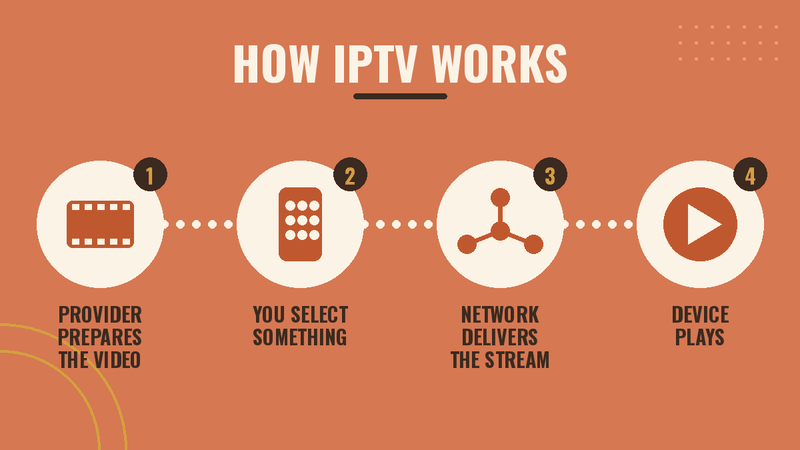
The basic process follows four steps:
- The provider prepares the video. Live channel feeds and stored programmes are encoded into formats suitable for network delivery.
- You select something to watch. Your television, set-top box, or app requests access to a channel or programme.
- The network delivers the stream. Video and audio travel as small units of data called packets.
- Your device plays the content. Its player converts the incoming data into pictures and sound.
The details vary between systems. Managed IPTV networks can use multicast to distribute the same live channel efficiently to many viewers. On-demand programmes generally use individual streams because viewers choose different titles and playback positions.
What can you watch with IPTV?
IPTV can deliver live television and video on demand. Some services also offer catch-up viewing, live pause, restart, or recording. These features depend on the provider, the programme’s availability, and the equipment you use.
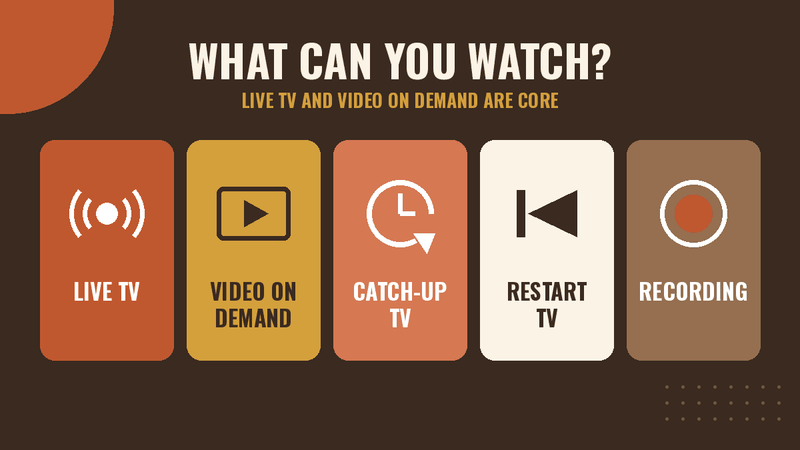
| Viewing option | What it means |
| Live TV | Watch a channel’s scheduled programming as it airs |
| Video on demand | Select a movie, episode, or other video and start it when you choose |
| Catch-up TV | Watch selected programmes after their original broadcast |
| Restart TV | Start a supported live programme from the beginning |
| Recording | Save supported programmes through a device or cloud recording feature |
Live TV and video on demand are core IPTV services. Additional viewing features vary between implementations.
Catch-up TV and recording serve different purposes. Catch-up gives you access to programmes the service makes available after broadcast. Recording saves a programme through a supported recording function. Neither guarantees permanent access, and some channels or programmes may have restrictions.
How is IPTV different from other television services?
The main difference is how the television signal reaches you. Traditional satellite television uses a satellite dish, and terrestrial television uses an antenna. IPTV carries programming as data over an IP network.
Cable television requires a little more explanation. A cable operator can provide conventional cable channels, IP-based television, or a combination of services. The physical cable entering your home does not, by itself, tell you how the video is delivered.
Is IPTV the same as OTT streaming?
Traditional IPTV and over-the-top streaming, or OTT, both deliver video using Internet Protocol. The distinction is mainly network management.
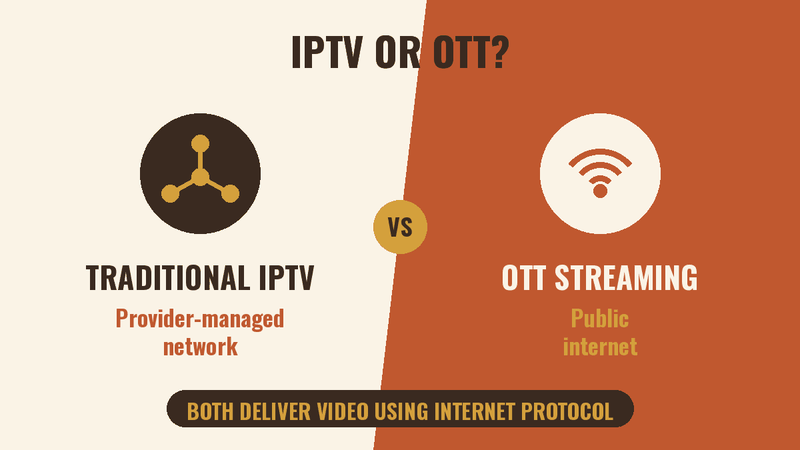
Traditional IPTV typically uses a provider-managed network designed to control service quality. OTT services deliver video over the public internet through your regular internet connection. Netflix is a familiar OTT example.
A service offering live channels through an internet app may therefore be OTT television, even when its advertising calls it IPTV. Live programming alone does not determine the technical category.
What do you need to watch IPTV?
You need access to a television service, a suitable network connection, and equipment that the service supports. The exact setup depends on whether the provider supplies a dedicated television box, an app, or another supported way to connect.
Before subscribing, check these requirements:
- Connection: Confirm whether the service works with your existing broadband or requires a particular broadband provider.
- Device: Check support for your exact television model, streaming device, computer, phone, or tablet.
- Application or box: Find out whether the provider supplies the player or requires separate equipment.
- Account access: Follow the provider’s activation and sign-in process.
- Simultaneous viewing: Check how many streams your plan allows at the same time.
A smart TV is useful only when it supports the required application or service. A compatible external box can provide access on a television that does not have the necessary app.
Device installation and simultaneous viewing are separate limits. Being able to install an app on several devices does not necessarily mean your subscription allows all of them to stream together.
Does an IPTV player include channels?
An IPTV player is software that plays and organises streams. A television service provides access to the content. These may come together in one provider’s app, or you may need to obtain them separately.
Some independent players require you to add a supported playlist or other connection details from your content provider. Paying for the player’s premium features may unlock functions such as additional customisation or viewing controls without including any channels.
For example, TiviMate states that it supplies a player rather than television content, and its paid upgrades unlock application features.
Before paying, establish whether the purchase covers the application, the television subscription, or both. This prevents a common setup problem: installing a working player and discovering that you still need a content service.
How much internet speed does IPTV need?
There is no single internet speed requirement that applies to every IPTV service. The necessary bandwidth depends on the stream’s quality, compression, and bitrate, as well as how many streams your household watches at once.
Bitrate describes how much data a stream uses each second. A connection must deliver that data consistently enough to keep playback running. Resolution labels such as HD or 4K do not fully describe bandwidth requirements because different encoding methods can produce different bitrates.
Start with your provider’s published requirements. Leave capacity for other household activity, including additional television streams, video calls, and downloads. For managed IPTV, also confirm any broadband or equipment requirements specific to the service.
Check the connection where you actually watch. A fast broadband plan can still deliver a poor experience when the viewing device has a weak Wi-Fi connection.
Why does IPTV sometimes buffer?
Playback pauses when the device cannot receive or process video quickly enough to continue. Possible causes include insufficient bandwidth, network congestion, unreliable Wi-Fi, and a device struggling to handle playback.
Players normally hold a small amount of upcoming video in a buffer. That reserve helps absorb brief interruptions, but playback can stop when the reserve runs out.
Try a wired Ethernet connection when supported, reduce competing downloads, and check whether the problem affects one channel or the entire service. Persistent problems may require help from the provider. A faster internet package will not resolve every playback issue.
Is IPTV legal?
IPTV is a delivery technology that can support legitimate television services. The key licensing question is whether the service has permission to distribute the content it offers. A streaming device or player does not establish that permission.
Unauthorised services can use the same equipment and delivery methods as legitimate providers. Paying a seller for access does not, by itself, prove that the seller holds the necessary distribution rights. Legal requirements and consequences vary by country.
When assessing a service, look for a clearly identified operator, understandable subscription terms, and credible information about its authorisation to carry the programming. Treat price, channel counts, and picture-quality claims as separate questions from licensing.
How can you decide whether IPTV suits you?
IPTV can suit viewers who want television delivered through their broadband connection, particularly when the service combines the channels they watch with useful on-demand features. Its suitability depends on your connection, supported equipment, and the actual subscription package.
Choose based on your viewing needs. Confirm the programmes you want, verify that the service works on your equipment, and understand its viewing limits before paying. A suitable IPTV service should make both access and everyday use straightforward.