Before You Cancel Cable
Before you cancel cable, confirm that your replacement delivers the programmes you actually watch, works on every TV you use, and fits your budget after all subscriptions and internet charges are included. A large channel count or low introductory price cannot answer those questions.
For U.S. households, the most useful starting point is a short list of viewing requirements. Build that list first, then test your replacement while cable is still available.
Which Channels and Programs Do You Need to Keep?
Your must-have list should identify specific stations, shows, and sporting events. Include whether you need to watch them live. Someone who follows local news and live games needs a different setup from someone who mainly watches movies and catches up on series later.
Ask everyone in your household what they would miss. Use this checklist to record the answers:
| Viewing category | What to put on your list | What counts as a suitable replacement |
| Local television | Exact local stations, evening news, and local programming | The station’s live feed or reliable antenna reception |
| Sports | Favourite teams, leagues, and must-watch events | Access to the relevant games in your location |
| National news | Specific networks and programmes | Live coverage if that is how you watch |
| Entertainment | Favourite series and the channels carrying them | Live episodes or an acceptable on-demand release schedule |
| Children’s programming | Specific shows, language options, and age preferences | The required episodes and usable parental controls |
| Specialty programming | International channels, religious programming, or niche interests | The exact channel or a satisfactory programme alternative |
Mark each item as essential, preferred, or optional. An essential item should determine whether a replacement passes. Optional channels should not push you into a more expensive package by themselves.
How Do You Verify Local Channels?
Check the replacement service’s lineup using your home ZIP code. Local network availability can depend on your home area, so a national channel list is insufficient.
Record the exact station you want, especially when local newscasts matter. A national news feed, clips from a station’s app, and that station’s complete live broadcast serve different needs.
An antenna may cover some local viewing without a television subscription. Reception depends on your address, surroundings, antenna, and placement. Coverage predictions are a starting point, and indoor reception can differ significantly from those predictions. Test reception before relying on it.
Connect the antenna to a compatible television tuner, run a channel scan, and watch each essential station long enough to notice interruptions. An antenna receives available broadcast stations. It does not replace cable-only networks.
How Do You Check Sports Coverage?
Verify the games you want to watch, rather than stopping at a sports channel’s name. For each favourite team or competition, check:
- Which services carry the relevant local, regional, national, and exclusive broadcasts.
- Whether your selected subscription tier includes those broadcasts.
- Whether your location creates a blackout restriction.
- Whether postseason games require different access.
A league subscription does not automatically provide every game. Geographic restrictions and exclusive broadcast arrangements can affect availability.
For example, a package that covers most regular-season games may still leave a gap for a particular nationally televised matchup. Identify that gap before paying for a full season.
What Combination of Services Fits Your Viewing Habits?
Choose your replacement around the essential items on your list. Consider whether you need a live television bundle, an antenna with on-demand subscriptions, or a smaller selection of individual services.
A live TV streaming service is worth evaluating when several household members depend on scheduled channels. An antenna and on-demand subscriptions may suit viewers whose live viewing centres on local broadcasts. Individual subscriptions may work when your interests are concentrated in a few series or sports offerings.
Avoid adding services simply to recreate every channel in your cable package. Assign each proposed subscription a job, such as “local news,” “favourite team,” or “current episodes of two essential shows.” Remove subscriptions that do not fill a meaningful gap.
For any internet-delivered television service, confirm the exact package, supported devices, billing terms, and customer support options. The term IPTV describes television delivered through internet protocol. The label alone does not establish channel availability or service quality.
Is Your Internet and TV Setup Ready?
Your setup is ready when the selected apps run on your devices and playback stays reliable during normal household use. The advertised speed of your internet plan is only part of that assessment. Check the connection where you actually watch.
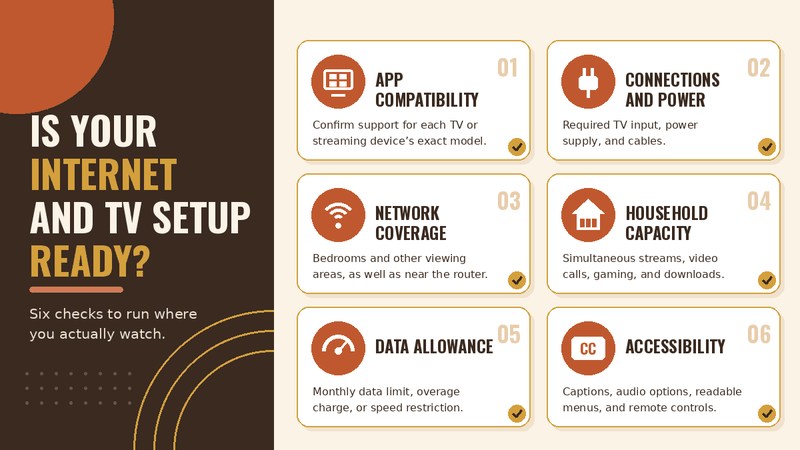
Use this setup checklist:
- App compatibility: Confirm support for each TV or streaming device’s exact model. A smart TV label does not guarantee support for every app.
- Connections and power: Check that any external streaming device has the required TV input, power supply, and cables.
- Network coverage: Check the connection in bedrooms and other viewing areas, as well as near the router.
- Household capacity: Allow for simultaneous television streams, video calls, gaming, and downloads.
- Data allowance: Review any monthly data limit, overage charge, or speed restriction in your internet plan.
- Accessibility: Confirm that captions, audio options, readable menus, and remote controls meet your household’s needs.
How Much Internet Speed Do You Need?
Use each service’s recommended speed for your intended picture quality, then allow room for other activity. Requirements differ. Netflix recommends 5 Mbps for one 1080p stream and 15 Mbps for one 4K stream. YouTube TV recommends 25 Mbps or more for available 4K programming. These are service-specific recommendations, not universal guarantees.
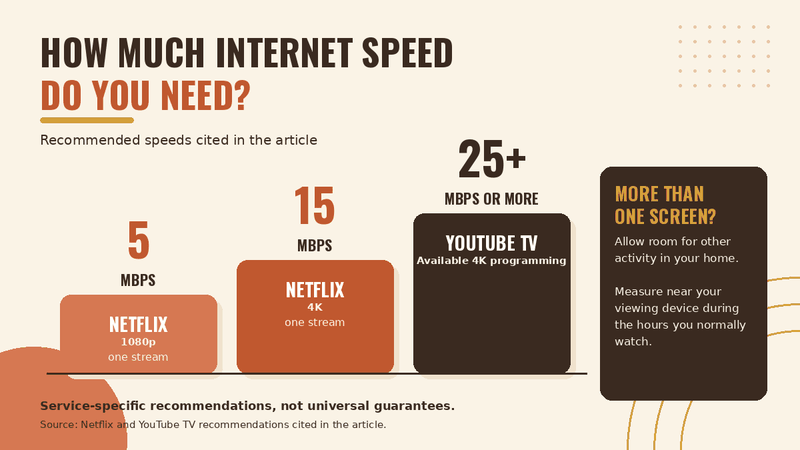
Measure performance near your viewing device during the hours you normally watch. A strong result beside the router does not establish that a bedroom TV has a reliable connection.
When playback struggles, compare Wi-Fi with a wired Ethernet connection where your device supports it. That comparison helps you decide whether to address wireless coverage before buying a faster internet plan.
Will the Replacement Support Your Household’s Viewing Habits?
Check simultaneous stream limits, recording features, and location rules separately. Each affects how your household can use the service.
Simultaneous streams means how many devices can watch at once. Count the busiest realistic evening. Separate user profiles should not be treated as proof that every person can stream simultaneously.
For recording, evaluate more than storage capacity. A cloud DVR stores recordings through the service rather than on your cable box. Check recording availability, retention periods, playback controls, and how the service handles live events.
Also ask:
- Can you pause live television or start an ongoing programme from the beginning?
- Can you skip commercials in the version you are watching?
- Can each person find and manage their recordings easily?
- Does the service work on the devices you use while travelling?
- Are there restrictions involving a designated home network?
Home-network requirements can affect living-room devices differently from mobile devices. Verify the rules before depending on one subscription at a second residence.
Do not assume existing cable DVR recordings will move to your replacement. Watch anything important before changing services, and confirm when access to the old recording library ends.
What Will Cutting Cable Actually Cost?
Compare your current total household bill with the full cost of the proposed setup. Include the internet price you will pay after removing television service, rather than assuming your current bundle price will continue.
Use this calculation:
New monthly total = internet after cancellation + TV subscriptions + required add-ons + recurring equipment charges + applicable taxes and fees
Include subscriptions you intend to keep on both sides of the comparison. A service you already pay for should not appear only in the new total or only in the old total.
Check the following before deciding:
- The regular price after introductory offers expire.
- Sports, premium-channel, and extra-stream charges.
- Any change to discounts on bundled services.
- One-time device, antenna, or installation costs.
- Contract charges or billing adjustments that apply to cancellation.
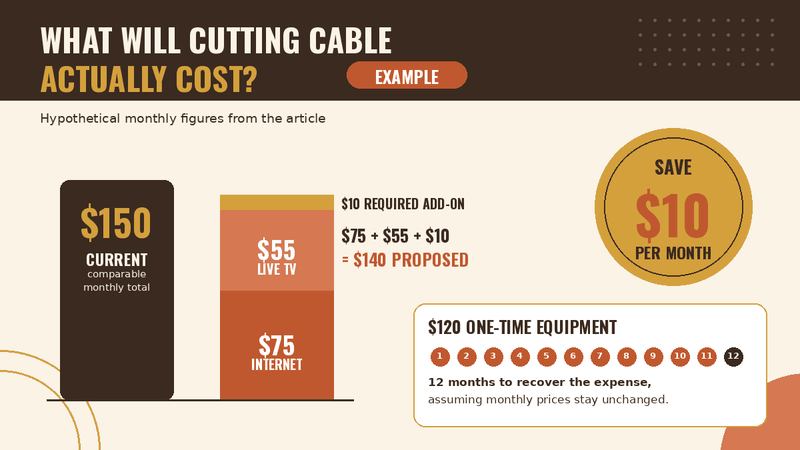
For example, suppose your current comparable monthly total is $150. Your proposed setup costs $75 for internet, $55 for live TV, and $10 for a required add-on. Those hypothetical figures produce $10 in monthly savings.
With $120 in one-time equipment costs, it would take 12 months to recover that expense, assuming the monthly prices stay unchanged. That calculation gives you a more useful decision point than comparing cable with a streaming service’s headline price.
How Should You Test the Replacement Before Canceling?
Run the replacement through several normal viewing sessions while cable remains available. Use a free trial when offered or a short paid overlap when necessary. Check the trial’s billing terms and renewal date before enrolling.
Follow this sequence:
- Set up the replacement account. Install the apps, establish any required home location, and organise favourites.
- Disconnect the cable box from your viewing routine. Use the replacement as your everyday option.
- Watch during a busy evening. Have household members use their usual devices simultaneously.
- Try the tasks that matter. Open local news, watch an essential live event when available, record a programme, and play it back later.
- Let everyone use it independently. Notice whether finding channels, changing apps, and controlling playback require repeated help.
Make sure the test does not depend on your existing cable subscription. Some network apps require an eligible television-provider login for live access. Successful playback through your current cable credentials does not prove that access will continue after cancellation.
Test through the replacement service’s own app or confirm that a network app recognises your new subscription.
Keep a short problem log with three categories: missing content, playback problems, and usability problems. Resolve essential gaps before proceeding. A trial proves how the setup works today, so confirm future must-watch events separately when they fall outside the test period.
What Should You Confirm When Canceling Cable?
Cancel after the replacement meets your essential requirements and you understand the resulting bill. Make the requested service change explicit, particularly when you are retaining internet through the same provider.
Before ending the call or completing the cancellation:
- Confirm the television cancellation date and any applicable charges.
- Obtain the new internet price and confirm which other services remain active.
- Ask how the change affects bundled subscriptions or discounts.
- Confirm exactly which rented devices and accessories must be returned.
- Record the return deadline and obtain cancellation confirmation.
Keep equipment-return receipts and shipping tracking details. Match returned devices to the equipment listed on your account, and retain the internet equipment you are still authorised to use. Return procedures can include device identification and proof of shipment.
Review the final cable bill and the first bill after the change. Check that television charges ended as agreed and that equipment returns were recorded.
Cancel when your essential viewing needs are covered, the replacement works during normal household use, and the complete cost is acceptable. An unresolved must-have channel or recurring playback problem is a reason to adjust the setup before making the switch.