For one IPTV stream, 10–15 Mbps for Full HD (1080p) or 25–50 Mbps for 4K is a practical planning target. The speed needs to be available at your TV or streaming device while you watch. Multiple TVs and other household activities increase the total capacity you need.
There is no single minimum that applies to every IPTV service. Video quality, compression, and connection stability all affect whether your internet connection is sufficient.
What internet speed do you need for each video quality?
Use the following ranges to estimate the download capacity needed for one active stream. They are planning targets with some breathing room, rather than guaranteed requirements for every channel.
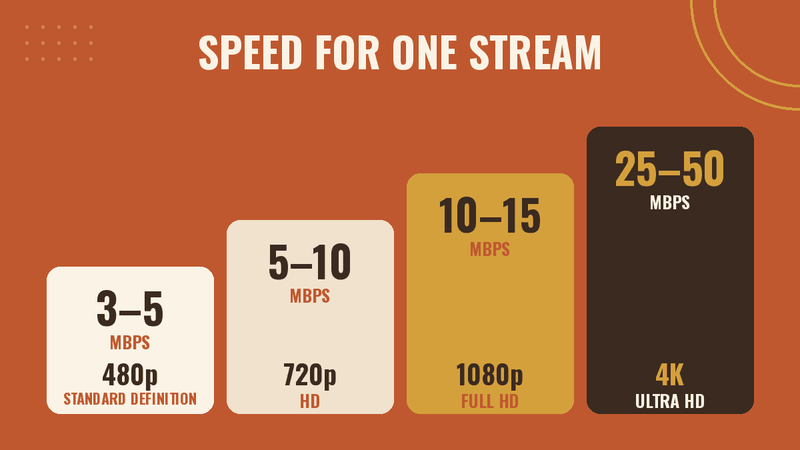
| Video quality | Practical download capacity for one stream |
| Standard definition (480p) | 3–5 Mbps |
| HD (720p) | 5–10 Mbps |
| Full HD (1080p) | 10–15 Mbps |
| Ultra HD (4K) | 25–50 Mbps |
Some services recommend lower speeds, while others require more capacity for the same resolution. Published recommendations include 5 Mbps or 10 Mbps for 1080p and 15 Mbps or 25 Mbps for 4K. Your IPTV provider’s requirement takes priority when it exceeds these planning ranges.
Mbps means megabits per second. It measures the rate of data transfer. It is different from MB/s, which means megabytes per second. Eight megabits equal one megabyte.
Why do IPTV speed requirements vary?
The stream’s bitrate, or the amount of data it delivers each second, determines its bandwidth demand. Resolution alone does not tell you the bitrate.
Two 1080p channels can need different amounts of bandwidth because their compression settings and frame rates differ. Video codecs such as H.264 and HEVC also affect the bitrate needed for a given picture quality. Streams can have temporary bitrate peaks, so a connection that only matches the average leaves little margin.
A channel labelled “4K” does not have one universal speed requirement. Check the service’s guidance and your device’s compatibility before choosing a broadband plan around that label.
How much speed do you need for multiple IPTV streams?
Add the requirements for the streams you expect to watch at the same time, then allow capacity for other household activity. Count active streams rather than every device connected to your router.
A useful calculation is:
Total download capacity = simultaneous stream requirements + other internet use + spare capacity
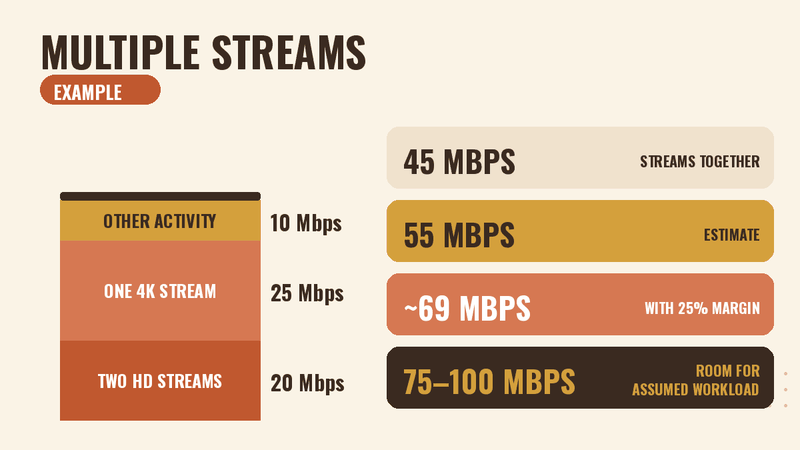
Consider a household where the service needs 10 Mbps for each HD stream and 25 Mbps for a 4K stream:
- Two HD streams need 20 Mbps.
- One 4K stream needs 25 Mbps.
- Together, the streams need 45 Mbps.
- Allowing another 10 Mbps for other activity brings the estimate to 55 Mbps.
- Adding a 25% planning margin brings it to about 69 Mbps.
In this example, a connection that consistently delivers 75–100 Mbps provides room for the assumed workload. The 10 Mbps allowance and 25% margin are illustrative choices, not fixed IPTV standards. Large downloads or additional streams can require more.
A stable 50 Mbps connection can therefore be sufficient for one 4K stream or several HD streams, depending on their actual requirements and other activity. A 100 Mbps plan provides more shared capacity, but it cannot guarantee reliable playback.
Does upload speed matter for watching IPTV?
Download speed is the main speed figure for IPTV viewing because your device receives the video.
Upload speed becomes more relevant when you also make video calls, upload files, or broadcast your own live video. Avoid choosing a plan using a download figure alone if other household activities also need substantial upload capacity. There is no universal upload-speed or ping requirement for every IPTV service.
How should you test your internet speed for IPTV?
Test the connection on the device you use to watch, if it offers a network test. A result from a phone beside the router may not represent the connection available to a TV in another room. Streaming-device connection checks can help identify weak signals and insufficient download capacity.
For a useful comparison:
- Test during your usual viewing hours. Repeat the test to look for substantial changes.
- Measure with other heavy activity paused. This gives you a baseline.
- Repeat with normal household activity running. This shows how much capacity remains during everyday use.
- Compare the results with your service’s requirements. Leave room for fluctuations instead of relying on the highest result.
A speed test measures the connection to its test server. It does not prove that your IPTV provider can deliver every channel at the same rate.
Why does IPTV buffer even with fast internet?
Buffering can come from weak Wi-Fi, network congestion, device limitations, or problems at the streaming provider. A fast broadband plan does not remove all of these causes.
Use comparisons to narrow down the problem:
- Try Ethernet when your device supports it. Improvement over Wi-Fi points toward a wireless connection problem.
- Pause large downloads and other streams. Improvement suggests competition for available capacity.
- Compare several channels and another streaming app. A problem limited to one channel or service suggests a feed or provider issue, although it does not prove the cause.
- Try a lower video-quality setting. Improvement suggests that delivery cannot consistently keep up with the higher-quality stream.
For Wi-Fi viewing, improve router placement and try 5 GHz when both devices support it and the signal is strong. Ethernet often provides a more consistent connection.
Upgrade your broadband plan when testing shows that available capacity falls short of your household’s needs. Investigate service-specific buffering when other apps work normally and the connection has enough capacity.
Can you use mobile internet or a data-capped plan for IPTV?
Mobile internet can work when it provides enough sustained speed, but check hotspot allowances, video restrictions, and speed reductions after you use your high-speed data allocation. These conditions vary by plan.
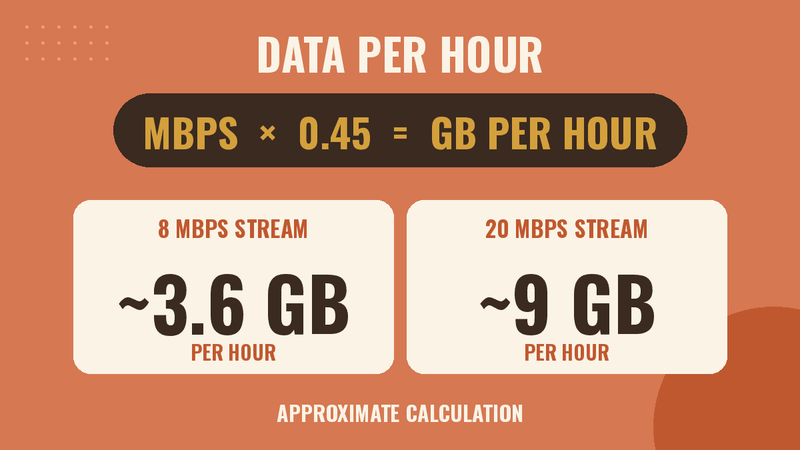
Data usage depends on the stream’s average bitrate, rather than the maximum speed of your internet plan. An approximate calculation is:
Data per hour in GB = average bitrate in Mbps × 0.45
A stream averaging 8 Mbps uses about 3.6 GB per hour, before network overhead. Watching it for three hours daily over 30 days uses about 324 GB. A stream averaging 20 Mbps uses about 9 GB per hour.
These are calculations for the assumed bitrates, not fixed usage figures for HD or 4K. Check your actual usage if your connection has a monthly limit.
Choose your IPTV speed by adding up simultaneous viewing requirements and other internet use, then checking what your devices consistently receive. That gives you a better basis for selecting a plan than the advertised broadband speed alone.