Affiliate Disclosure: This article contains affiliate links, and we may receive a commission if you subscribe through them. The comparison is based on research, with no direct playback testing. The provider order and ratings do not establish measured performance.
Are you looking for live television from home and abroad without constant buffering, missing channels, or confusing setup? Comparing subscriptions becomes harder when large catalogue figures hide practical differences in language coverage, viewing schedules, and household screen limits. A service that suits one viewer may frustrate a family watching different programmes at the same time. The right match should fit your essential channels, preferred device, and budget while keeping the commitment manageable. Start with the programmes you actually watch, then check playback, account rules, and payment terms before subscribing.
Quick Recommendations
OSIRISIPTV deserves an early look for international channel coverage and flexible playback formats. OrigineTV is worth comparing when European programming, catch-up viewing, and manual renewal are priorities. SofaIPTV offers another route for households comparing dedicated apps and different device tiers. The best premium option depends on your viewing habits, local connection, and required simultaneous streams. Your shortlist should include services that carry your essential programmes and work with your preferred player. A large catalogue alone cannot establish picture quality, consistent availability, or suitability for your household.
8 Best IPTV Service Providers (Compared)
Start with the viewing need closest to yours, then compare the full review and subscription terms.
- OSIRISIPTV: Best for international viewing with flexible playlist and device options
- OrigineTV: Best for European viewing with catch-up access and manual renewal
- SofaIPTV: Best for households comparing dedicated apps and different device tiers
- iScreenHD IPTV: Best for North American households comparing simultaneous screens and catch-up
- USA LIVE IPTV: Best for American television with optional additional household viewing connections
- GoCheap IPTV: Best for budget-conscious viewers starting with a short monthly subscription
- IPTV Harmony: Best for international viewers seeking catch-up and longer evaluation access
- Tellystudio: Best for individual viewers combining live television with guided setup
Top IPTV Providers for International Viewers: Comparison Table
Channel and VOD figures describe catalogue size. Availability, language options, working streams, and picture quality can vary.
| IPTV Services | Channels | VOD | Get Started |
|---|---|---|---|
| OSIRISIPTV | 60,000+ | 140,000+ | Visit Site |
| OrigineTV | 55,000+ | 270,000+ | Visit Site |
| SofaIPTV | 22,000+ | 80,000+ | Visit Site |
| iScreenHD IPTV | 35,000+ | 158,000+ | Visit Site |
| USA LIVE IPTV | 20,000+ | 136,000+ | Visit Site |
| GoCheap IPTV | 20,000+ | 40,000+ | Visit Site |
| IPTV Harmony | 55,000+ | 250,000+ | Visit Site |
| Tellystudio | 30,000+ | 157,000+ | Visit Site |
Detailed IPTV Provider Reviews
1) OSIRISIPTV
Quick Summary
| Summary | Details |
|---|---|
| ⭐ Our Review Rating | 4.6/5 |
| 📺 Channels | 60,000+ |
| 🍿 Movies & TV Shows | 140,000+ |
OSIRISIPTV is worth considering when you want international live television alongside on-demand entertainment and several playback options. Its lineup covers European markets and other regions, making it relevant to viewers with mixed-language preferences. I shortlisted OSIRISIPTV because its M3U, MAG, and Enigma support offers several setup routes. A 24-hour free trial provides an opportunity to check your essential channels before committing. Standard access permits one active stream, while a separate multiroom package supports additional viewing. Confirm how the 7 Day Money Back Guarantee applies after activation, and judge the service on your own device rather than catalogue size alone.
OSIRISIPTV Features:
- Live Channels: OSIRISIPTV lists 60,000+ channels, with international categories covering news, entertainment, and regional viewing preferences.
- On-Demand Library: Access to 140,000+ VOD entries adds movies and series alongside scheduled live television viewing.
- Multiroom Options: Standard accounts permit one active stream, while separate multiroom packages support two simultaneous connections.
- Picture Options: Available HD, Full HD, and 4K streams vary by channel, source, and playback compatibility.
- Sports Coverage: Live sporting events form part of the lineup, with individual broadcast availability requiring confirmation.
- Device Support: Compatible smart televisions, smartphones, and computers offer several viewing routes through suitable IPTV applications.
- Playlist Formats: M3U, MAG, and Enigma formats accommodate different players and supported set-top boxes during setup.
- Program Guide: EPG support provides television listings, although guide completeness should be checked against your preferred channels.
- Catalogue Updates: Regular channel and VOD updates can refresh available entertainment without making individual titles permanent.
OSIRISIPTV Pricing
| 1 Month | 3 Months | 6 Months | 12 Months |
|---|---|---|---|
| €9.99 | €24.99 | €44.99 | €69.99 |
Pros:
- Multiple playlist formats accommodate existing viewing setups.
- International coverage suits varied household language preferences.
- Short subscriptions reduce the initial financial commitment.
Cons:
- Standard subscriptions allow only one active stream.
Expert Advice
If two people in your home watch different programmes at the same time, compare OSIRISIPTV’s multiroom plan with its standard subscription. The standard account allows one active stream, while multiroom supports two. Try your usual channels on the devices you plan to keep. Before paying, get written clarification of refunds after activation, because the guarantee and cancellation wording are inconsistent.
2) OrigineTV
Quick Summary
| Summary | Details |
|---|---|
| ⭐ Our Review Rating | 4.5/5 |
| 📺 Channels | 55,000+ |
| 🍿 Movies & TV Shows | 270,000+ |
OrigineTV suits viewers comparing European programming with a substantial international selection and on-demand entertainment. Its combination of an electronic program guide, catch-up options, and manual renewal can appeal to people who plan viewing around a busy schedule. I kept OrigineTV near the top because those features offer practical flexibility beyond catalogue size. You can request a 24-hour free trial to check your channels and device. Single-connection access allows one stream at a time, even when the account is installed elsewhere. Before payment, obtain written confirmation of whether the 7-Day Money-Back Guarantee applies after activation and which refund conditions govern your purchase.
OrigineTV Features:
- Live Channels: OrigineTV lists 55,000+ channels, covering European viewing alongside programming from several other international regions.
- On-Demand Selection: Its 270,000+ VOD entries offer films and series, with language and title availability varying.
- Screen Allowances: Single-connection access permits one stream, while additional simultaneous viewing requires an appropriate multi-screen package.
- Streaming Quality: HD, Full HD, and 4K options depend on the particular stream and compatible equipment.
- Live Sports: Sporting events accompany general entertainment, with your preferred broadcasts needing confirmation before any purchase.
- Device Compatibility: Supported platforms include Fire TV, Android, Apple devices, smart televisions, and compatible computer players.
- Television Guide: Electronic program listings help organise upcoming viewing, subject to coverage for your preferred channels.
- Catch-Up Viewing: Eligible past broadcasts can be replayed, with availability depending on channel support and playback compatibility.
- Manual Renewal: Subscriptions expire without automatic renewal, allowing you to decide whether to extend access again.
OrigineTV Pricing
| 3 Months | 6 Months | 12 Months | Lifetime |
|---|---|---|---|
| €34.99 | €48.99 | €67.99 | €99.99 |
Pros:
- Catch-up playback helps recover eligible missed broadcasts.
- Manual renewal gives you control over extensions.
- European coverage suits households watching several languages.
Cons:
- Single-screen plans prevent simultaneous viewing across devices.
Expert Advice
OrigineTV suits viewers who prefer deciding when to renew their subscription. Its plans do not renew automatically, so keep track of the expiry date if you want to continue watching. If you mainly watch during certain seasons, match the subscription length to that routine. Before renewing, confirm that the package still fits your channels and screen requirements.
3) SofaIPTV
Quick Summary
| Summary | Details |
|---|---|
| ⭐ Our Review Rating | 4.3/5 |
| 📺 Channels | 22,000+ |
| 🍿 Movies & TV Shows | 80,000+ |
SofaIPTV offers live television and on-demand entertainment with dedicated app options and selectable device packages. That makes it relevant to households deciding how several people will watch, especially when televisions and mobile devices share the same subscription budget. I highlighted SofaIPTV because its device tiers make household planning a useful starting point. A 24-hour free trial gives you time to check setup, channel organisation, and everyday playback. Compare the package that matches your simultaneous viewing needs rather than assuming every plan supports several screens. Its monthly and longer subscriptions also let you weigh a smaller initial commitment against paying for extended access.
SofaIPTV Features:
- Live Television: SofaIPTV lists 22,000+ channels, combining international programming with news, entertainment, and live sporting content.
- VOD Collection: Browse 80,000+ VOD entries for on-demand movies and series beyond the scheduled television lineup.
- Device Packages: Selectable packages cover different device allowances, with simultaneous viewing governed by your purchased tier.
- Resolution Options: Selected streams support 4K playback, while actual resolution depends on content and your equipment.
- Sporting Events: Live sports accompany regular programming, giving sports-focused viewers another category to evaluate during trials.
- Supported Devices: Firestick, Android, iOS, Windows, and compatible smart televisions provide several supported routes for viewing.
- Dedicated Apps: Proprietary app options provide an alternative to compatible third-party players for supported devices during setup.
- Guide Support: EPG functionality can help organise live viewing, with listings dependent on channel and player compatibility.
- Setup Assistance: Around-the-clock support covers installation, troubleshooting, and account questions, although response times can vary considerably.
SofaIPTV Pricing
| 1 Month | 3 Months | 6 Months | 12 Months | Lifetime |
|---|---|---|---|---|
| $13 | $28 | $49 | $70 | $220 |
Pros:
- Device tiers accommodate different household screen requirements.
- Dedicated apps offer an additional setup option.
- Monthly plans limit your initial subscription commitment.
Cons:
- Larger device allowances require more expensive packages.
Expert Advice
With SofaIPTV, start with the app you will actually watch through. Ask which dedicated app supports your exact television or streaming device, then compare its controls with your existing M3U-compatible player. Check how easily you can find channels, manage favourites, and move through menus with your remote. Choose the setup that feels comfortable before committing to a longer subscription.
4) iScreenHD IPTV
Quick Summary
| Summary | Details |
|---|---|
| ⭐ Our Review Rating | 4.1/5 |
| 📺 Channels | 35,000+ |
| 🍿 Movies & TV Shows | 158,000+ |
iScreenHD IPTV is relevant to viewers prioritising United States and Canadian programming while comparing several household screens. It combines live television, on-demand entertainment, catch-up channels, and app access, giving you several ways to organise viewing. I considered iScreenHD IPTV because its multi-connection packages distinguish household access from simple device compatibility. A 36-hour free trial provides a useful window for checking your regular channels and preferred playback route. Packages can support up to five simultaneous devices, but the allowance depends on the tier purchased. Compare the full package price and your actual screen needs before treating a single-device offer as a family subscription.
iScreenHD IPTV Features:
- Live Channels: iScreenHD IPTV lists 35,000+ channels, with United States and Canadian viewing central to its offering.
- Movie Library: The 158,000+ VOD entries provide on-demand entertainment alongside the service’s scheduled live television selection.
- Simultaneous Screens: Package options support up to five simultaneous devices, with higher allowances requiring the corresponding subscription.
- Picture Quality: Selected content supports Full HD and 4K, subject to stream quality and compatible playback hardware.
- Sports Selection: Live sporting content adds event-focused viewing, although individual broadcast access should be confirmed before payment.
- Device Support: Compatible platforms include Firestick, Android, iOS, MAG, Formuler, and smart televisions through suitable applications.
- Program Listings: EPG access helps identify current and upcoming broadcasts, with practical coverage varying across individual channels.
- Catch-Up Channels: Eligible broadcasts support later playback, providing flexibility when you cannot watch at the scheduled time.
- App Access: Dedicated app access and a web player offer alternative viewing routes on compatible playback devices.
iScreenHD IPTV Pricing
| 1 Month | 3 Months | 6 Months | 12 Months |
|---|---|---|---|
| $14.99 | $29.99 | $49.99 | $89.99 |
Pros:
- Multi-connection plans support separate household viewing sessions.
- Catch-up playback adds flexibility beyond live broadcasts.
- Browser access offers another compatible viewing route.
Cons:
- Extra simultaneous screens increase the subscription price.
Expert Advice
Make iScreenHD IPTV’s catch-up channels earn their place in your subscription if your schedule changes often. Choose a programme that has already aired and try opening its replay in your preferred app. Catch-up access and the on-demand movie library serve different viewing needs, so check each separately. A working live channel does not establish that its earlier broadcasts are available to replay.
5) USA LIVE IPTV
Quick Summary
| Summary | Details |
|---|---|
| ⭐ Our Review Rating | 4.0/5 |
| 📺 Channels | 20,000+ |
| 🍿 Movies & TV Shows | 136,000+ |
USA LIVE IPTV deserves consideration when American television is your priority and additional household connections are useful. Its live lineup, on-demand entertainment, television guide, and catch-up options resemble the everyday viewing functions many people expect from cable. I noted USA LIVE IPTV for its American channel categories and optional extra connections. Base packages allow one active connection, while separate bundles accommodate more simultaneous viewing. A 30-Day Money-Back Guarantee is part of the offer, subject to the applicable purchase terms. Pay particular attention to subscription length and the total due because some displayed figures are monthly rates attached to longer commitments.
USA LIVE IPTV Features:
- Live Lineup: USA LIVE IPTV lists 20,000+ channels, combining American television categories with additional international viewing options.
- On-Demand Entertainment: Explore 136,000+ VOD entries spanning movies, series, and other entertainment outside scheduled live broadcasts.
- Additional Connections: Extra-connection bundles support several simultaneous viewers, while the base package permits only one active connection.
- Picture Options: Selected channels offer 4K playback, although resolution and stability depend on stream and device conditions.
- Sports Programming: Live sports sit alongside news and entertainment, with event coverage requiring confirmation before purchasing access.
- Device Compatibility: Supported viewing routes include compatible smart televisions, streaming boxes, mobile devices, computers, and browser access.
- Television Listings: EPG support provides upcoming schedules, helping you plan viewing around channels with available guide information.
- Catch-Up Access: Eligible channels offer replay options, allowing later viewing where the service and player support it.
- Closed Captions: Caption support can improve accessibility when the selected programme and playback application provide compatible text.
USA LIVE IPTV Pricing
| 3 Months | 12 Months |
|---|---|
| $16.65/mo | $7.99/mo |
The figures marked /mo are monthly rates for their respective subscription terms, not upfront totals. A $5.83 rate also appears in the offer, but confirm its subscription term and total payment before treating it as a one-month option.
Pros:
- American channel categories suit United States viewing.
- Additional connections can accommodate several household screens.
- Catch-up options complement scheduled live television viewing.
Cons:
- Base packages restrict playback to one connection.
Expert Advice
When comparing USA LIVE IPTV, look at the full payment and subscription term alongside the monthly rate. Its longer packages display monthly figures with a separate billed total, so the smaller number does not represent the complete upfront payment. Confirm the amount due, the renewal price, and cancellation conditions before checkout. This makes the commitment easier to compare with your household budget.
6) GoCheap IPTV
Quick Summary
| Summary | Details |
|---|---|
| ⭐ Our Review Rating | 3.9/5 |
| 📺 Channels | 20,000+ |
| 🍿 Movies & TV Shows | 40,000+ |
GoCheap IPTV offers a manageable starting point for viewers who want to compare live television and on-demand entertainment without a large initial payment. Its monthly access, device tiers, and compatible player options suit people testing how IPTV fits their routine. I included GoCheap IPTV because its short subscription terms make an initial comparison more practical. A 24-hour free trial allows you to check essential channels and setup before paying. Entry access permits one active connection, with additional viewing requiring the appropriate package. Treat its lifetime option as a commitment dependent on continued service operation, rather than a promise of permanent content availability.
GoCheap IPTV Features:
- Live Channels: GoCheap IPTV lists 20,000+ channels, with global programming spanning news, entertainment, and sporting content.
- VOD Access: Its 40,000+ VOD entries provide movies and series alongside the scheduled live television selection.
- Screen Options: Entry access permits one active connection, while additional simultaneous viewers require an appropriate expanded package.
- Streaming Formats: Selected streams offer HD, Full HD, and 4K, depending on content and compatible playback devices.
- Sports Viewing: Sporting content accompanies entertainment, allowing viewers to compare preferred event coverage during available trial access.
- Supported Platforms: Compatible smart televisions, computers, iOS, and Android devices provide several supported routes for everyday viewing.
- Program Guide: Electronic television listings help plan upcoming broadcasts, with coverage depending on channel and player support.
- Library Updates: Weekly VOD updates can refresh entertainment choices, although individual titles may change or become unavailable.
- Parental Controls: Parental controls can restrict adult content or selected categories through PINs in compatible player applications.
GoCheap IPTV Pricing
| 1 Month | 3 Months | 6 Months | 12 Months | Lifetime |
|---|---|---|---|---|
| $12 | $26 | $46 | $70 | $200 |
Pros:
- Monthly access keeps the initial commitment modest.
- Screen tiers accommodate different household viewing patterns.
- Compatible apps can provide PIN-based content restrictions.
Cons:
- Additional simultaneous screens require more expensive tiers.
Expert Advice
Parents considering GoCheap IPTV should set up content restrictions in the player their children will actually open. PIN-based locks depend on compatible apps, so a restriction on your television should not be assumed to apply on a phone. Lock the relevant categories, then check them on each viewing device. This helps you see whether the chosen app provides the controls your household needs.
7) IPTV Harmony
Quick Summary
| Summary | Details |
|---|---|
| ⭐ Our Review Rating | 3.7/5 |
| 📺 Channels | 55,000+ |
| 🍿 Movies & TV Shows | 250,000+ |
IPTV Harmony combines international live programming with on-demand entertainment, catch-up viewing, and caption support. It is relevant to households balancing different language preferences and viewing schedules rather than focusing only on live events. I favoured IPTV Harmony for the option to extend the evaluation period before committing to a longer subscription. A 24-hour free trial is available, with a 7-day extended trial for €9.99 when you want more time. One connection permits one active stream, while separate account packages accommodate simultaneous viewers. Confirm your preferred channels, caption availability, and catch-up playback because these features can vary by programme and compatible application.
IPTV Harmony Features:
- Live Coverage: IPTV Harmony lists 55,000+ channels, covering several European markets alongside North American and international programming.
- VOD Selection: The 250,000+ VOD entries expand viewing beyond scheduled broadcasts with movies and television series.
- Account Packages: Basic access permits one stream, while two-account and three-account packages support additional simultaneous household viewers.
- Picture Quality: Selected content supports Full HD and 4K, with actual playback dependent on the individual stream.
- Sports Content: Live sporting events accompany entertainment and news, although specific broadcasts require confirmation before purchasing access.
- Device Options: Compatible equipment includes Fire TV, MAG, Formuler, Windows, and supported smart television playback applications.
- Guide Integration: Electronic program listings support scheduled viewing, with guide coverage dependent on your chosen channel lineup.
- Replay Features: Catch-up options enable later viewing of eligible broadcasts through a compatible application and supported channels.
- Caption Support: Closed captions are available for compatible content, with language choices and completeness varying by programme.
IPTV Harmony Pricing
| 3 Months | 6 Months | 12 Months |
|---|---|---|
| €34.99 | €48.99 | €64.99 |
Pros:
- Extended trial access allows a longer comparison.
- Multi-account packages support separate simultaneous viewing sessions.
- Catch-up and captions accommodate different viewing needs.
Cons:
- Basic connections permit only one active stream.
- Specific channel availability can change without notice.
Expert Advice
IPTV Harmony’s private control link is worth exploring if you mainly watch a small set of countries or channels. It lets you remove unwanted content and organise favourites, which can make a large lineup easier to browse. Start with the programmes you watch regularly, then check how the list appears in your chosen player. Keep the control link private because it provides access to subscription-management tools.
8) Tellystudio
Quick Summary
| Summary | Details |
|---|---|
| ⭐ Our Review Rating | 3.6/5 |
| 📺 Channels | 30,000+ |
| 🍿 Movies & TV Shows | 157,000+ |
Tellystudio is worth comparing when one person wants live television and on-demand entertainment with help getting started. Its electronic television guide and setup resources suit viewers who prefer scheduled programmes alongside movies and series. I retained Tellystudio because its device guides provide a practical entry point for common streaming equipment. A 24-hour free trial gives you an opportunity to check your preferred channels and compatible application. Each subscription permits one active stream, and simultaneous viewing requires additional subscriptions. That restriction makes it a clearer fit for individual viewing than a shared household expecting several independent screens under the entry package.
Tellystudio Features:
- Live Television: Tellystudio lists 30,000+ channels, combining international programming with news, entertainment, and live sporting content.
- On-Demand Catalogue: Access to 157,000+ VOD entries provides movies and series beyond the scheduled live television lineup.
- Connection Rules: Each subscription permits one active stream, with additional simultaneous devices requiring separately purchased subscriptions.
- Resolution Options: Selected content supports Full HD and 4K playback, subject to stream quality and compatible equipment.
- Sports Viewing: Live sporting programming complements general entertainment, with specific events needing confirmation before any subscription purchase.
- Device Compatibility: Supported routes include Firestick, compatible smart televisions, and IPTV Smarters Pro on suitable playback devices.
- Electronic Guide: Program listings help organise upcoming viewing, although guide completeness should be checked for essential channels.
- Customer Assistance: Support covers setup, billing, and technical questions, with availability separate from any guaranteed response time.
- Installation Guides: Device-specific instructions cover common streaming equipment, providing useful steps for compatible player setup and login.
Tellystudio Pricing
| 1 Month | 3 Months | 6 Months | 12 Months | Lifetime |
|---|---|---|---|---|
| $15 | $35 | $65 | $95 | $365 |
Pros:
- Short subscriptions suit occasional live television viewing.
- Electronic listings help plan upcoming viewing sessions.
- Setup guides cover common streaming device options.
Cons:
- Simultaneous viewing requires purchasing additional separate subscriptions.
Expert Advice
Keep Tellystudio’s subscription credentials beside the setup instructions for your device. Its Android guide includes an Xtream Codes login with separate fields for the server URL, username, and password. Copy each detail into the matching field and check for typing errors if authorisation fails. If the details still do not work, ask support to confirm the correct configuration for your account.
How We Evaluated IPTV Service Providers
This comparison addresses international viewers looking for live television, on-demand entertainment, and a manageable subscription commitment. I compared provider descriptions, player documentation, subscription conditions, and the commercial details behind each offer. Device guidance and content-authorisation information helped distinguish available features from assumptions about compatibility or broadcasting rights.
The providers appear in the requested comparison order. Ratings descend with that order and function as editorial labels, rather than calculated scores for reliability, picture quality, or support. No direct playback testing, paid subscriptions, timed support interactions, or verified channel inventory formed part of this evaluation. Feature availability remains dependent on the package, application, region, and individual stream. The comparison does not establish that any listed provider holds broadcasting rights for every territory. Technical compatibility and a large catalogue do not resolve that question.
- Viewing fit: International coverage, language preferences, and essential programming received attention beyond catalogue size.
- Practical access: Device compatibility was considered separately from the number of simultaneous streams.
- Subscription value: Prices retained their stated currencies and units, with longer commitments considered cautiously.
- Evidence limits: Resolution labels, uptime promises, and testimonials were not treated as measured performance.
- Purchase conditions: Trial access, activation, refund eligibility, and content authorisation require confirmation before payment.
How Can You Test an IPTV Service Before Committing?
Evaluate the service on the device, connection, and viewing schedule you intend to keep.
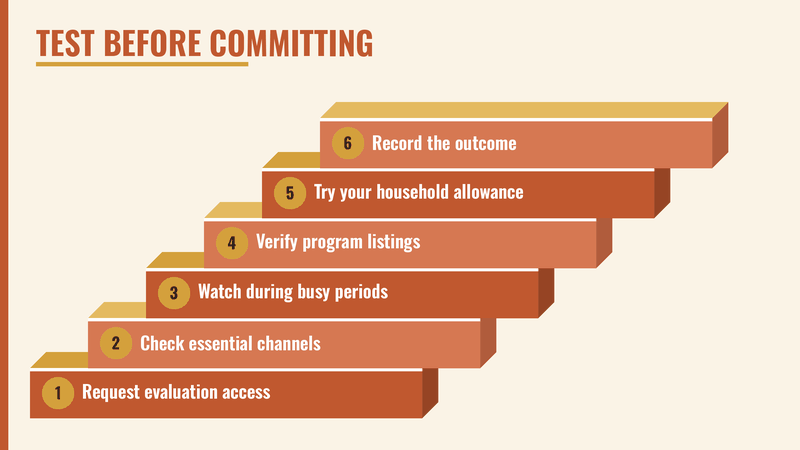
- Request evaluation access. Ask for an available trial or choose the shortest suitable subscription. Confirm when access begins so the evaluation window fits your schedule.
- Check essential channels. Open the actual programmes you regularly watch, including relevant regional feeds. Confirm language options and availability rather than relying on category names alone.
- Watch during busy periods. Keep a preferred live channel running during your normal evening viewing or a relevant event. Note interruptions, picture changes, and sound synchronisation.
- Verify program listings. Compare the guide with what is playing, check the time zone, and try an eligible catch-up programme when that feature is important.
- Try your household allowance. Open only the number of concurrent streams permitted by the test account. Confirm whether extra screens need another tier or separate subscriptions.
- Record the outcome. Keep a short list of working channels, setup difficulties, and unresolved questions. Compare another candidate under similar conditions before paying for extended access.
Why Do IPTV Providers and Player Apps Need Separate Checks?
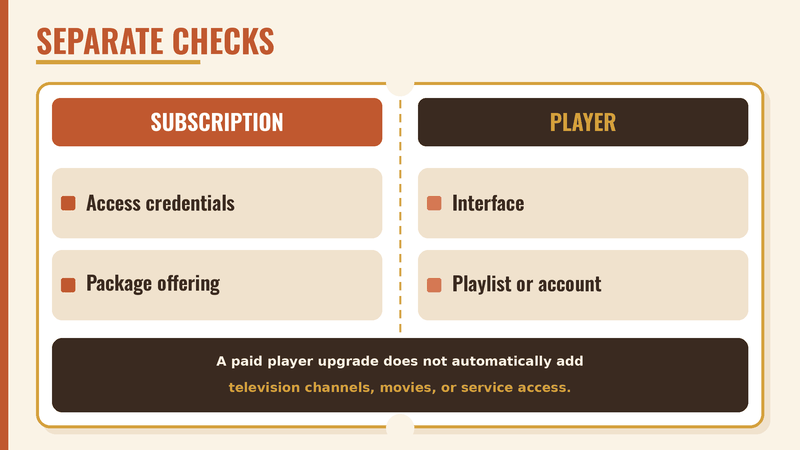
An IPTV subscription and an IPTV player solve different parts of the viewing process. The subscription provides access credentials and the package offering, while the player supplies the interface that opens your playlist or account. A paid player upgrade does not automatically add television channels, movies, or service access. Equally, a subscription that works in one application does not guarantee that every feature will appear in another. Confirm the login format, supported device, and any separate app licence before paying. A player designed for television remotes may also be awkward or unsupported on a phone.
Treat the daily interface as a separate purchasing decision. Channel favourites, parental controls, recording, and multiview depend on what the application supports, while guide information and catch-up require compatible service data. A recording function does not establish permission to record every broadcast, and multiview may consume more than one permitted connection. Request a setup method for your exact device, then test the functions you need. This helps you identify whether a missing feature comes from the package, the selected application, or their compatibility.
What Should You Check Before Paying for IPTV?
Confirm these purchase conditions before moving from a trial or short subscription to a longer commitment.
- Verify content authorisation. Ask whether the seller is authorised to provide your preferred channels in your country. A payment receipt or copyright notice alone does not establish broadcasting rights.
- Confirm the complete charge. Check the currency, subscription term, amount due immediately, and any separate player fee. A monthly-equivalent figure can accompany a larger payment for the full term.
- Clarify account restrictions. Obtain the permitted simultaneous stream count and any location or household conditions. Installing credentials on several devices does not automatically authorise concurrent playback.
- Read activation and refund terms. Establish when the service is considered delivered and which problems qualify for cancellation. Get written clarification when a guarantee and activation restriction appear inconsistent.
- Review extended access carefully. Check what an annual or lifetime package promises, including service continuity and changing content. A long subscription cannot ensure that particular channels remain available.
- Keep purchase records. Retain the order confirmation, applicable terms, and support route. Prefer a payment method whose dispute process you understand, and avoid sharing account credentials.
Verdict: Best IPTV Service Providers
I would start with OSIRISIPTV, OrigineTV, and SofaIPTV, then narrow the choice around channels, screen limits, and commitment. A suitable subscription still needs to work with your viewing routine and equipment.
- OSIRISIPTV: Offers international coverage and several playback formats. Its standard single-stream allowance makes it a sensible first comparison for individual viewers, while households should examine the separate multiroom option before committing.
- OrigineTV: Combines European programming, catch-up options, and manual renewal. It suits viewers who want control over extending access, although simultaneous viewing requires the appropriate package and refund eligibility needs clarification before activation.
- SofaIPTV: Provides dedicated app options and selectable device tiers. It deserves consideration when household screen planning comes first, with the final choice depending on compatible equipment and the price of the required tier.
FAQs
Which IPTV provider should I compare first?
Start with the provider whose viewing focus matches your essential channels and household needs. OSIRISIPTV suits an initial comparison for international coverage, OrigineTV merits attention for European viewing, and SofaIPTV is relevant when dedicated apps and device tiers are priorities.
Can I watch IPTV without a smart TV?
Yes, a compatible streaming device, computer, phone, or tablet can provide another viewing route. Your subscription must work with the selected device and application. Check the exact setup instructions before buying hardware, and remember that simultaneous stream limits still apply.
Does a 4K IPTV package make every channel 4K?
No. A package with 4K options can also contain lower-resolution streams. Actual picture quality depends on the source, selected channel, playback hardware, and network conditions. Confirm the programmes you care about rather than treating a package label as a universal resolution guarantee.
Do I need a VPN for IPTV?
A VPN is not automatically required for every IPTV subscription. Check the service rules, your network conditions, and applicable local restrictions before deciding. A VPN does not create content authorisation or guarantee better playback, and some services restrict changes in connection location.
Is IPTV catch-up the same as recording?
No. Catch-up lets you replay eligible past broadcasts through the service, while recording depends on a compatible application, storage, account allowance, and applicable permissions. Having one feature does not establish access to the other, and neither guarantees coverage for every channel.
Does IPTV include separate subscriptions to other streaming apps?
Do not assume so. An IPTV catalogue containing films or shows does not automatically include separate accounts for other streaming platforms. Treat an outside subscription as included only when the package explicitly provides it with appropriate authorisation and clear applicable terms.
Important Notes:

“Monthly rates do not establish the amount payable today. Checkout totals, taxes, additional connection charges, and renewal terms have not been verified. The additional $5.83 rate is excluded because its subscription term is unclear.”

“Refund eligibility is unresolved in this review. The article identifies conflicting guarantee and activation-related wording; do not assume an activated subscription is refundable. Obtain written confirmation of the applicable conditions before payment.”

“‘Lifetime’ duration is not defined in this comparison. Confirm whose lifetime the term refers to and what happens if the service closes or changes.”